Table of contents :
AI coding: the enterprise guide to coding with AI
Your developers are already using AI coding tools. The question is no longer whether to adopt them, but who decides which model can access your source code.
Ready to transform your business with AI?
Discover how AI can transform your business and improve your productivity.
AI coding has moved beyond experimentation and into daily engineering work—often before IT has formally approved a tool. This guide explains how AI-assisted coding works, where it delivers value, which risks it introduces, and how to choose a solution that works for an enterprise.
What is AI coding?
AI coding is the use of large language models to write, complete, fix, explain, or refactor software code. Modern tools can go beyond suggesting the next line: they can read a project, propose changes across several files, and run commands.
Three main AI coding use cases exist today:
- Code completion: AI extends what a developer is typing, line by line, inside the editor.
- Developer chat: A developer describes a need and receives code, tests, explanations, or debugging guidance.
- AI coding agents: An agent receives an objective, plans steps, edits files, and checks its work.
The third category changes the interaction. Instead of asking, “Write this function,” a developer can ask: “Fix this session bug, add tests, and explain what changed.”
Swiftask applies this agent-based approach to enterprise AI: an agent, approved tools, controlled data access, and an auditable record of actions.
Key takeaway: AI coding includes code completion, technical chat, and autonomous coding agents. As autonomy increases, review and governance become more important.
How does an AI coding assistant work?
An AI coding assistant combines a language model, project context, and execution tools. Each component affects whether the output is useful, secure, and maintainable.
The model generates code
The model produces suggestions, explanations, and edits. No model is consistently best for every software task. A model that performs well for refactoring may be less effective for system-level debugging or a specific language ecosystem.
A multi-model strategy lets teams select an appropriate model for each task rather than locking all developers into one vendor. Explore Swiftask’s AI model hub to centralize model access under a shared governance layer.
Context determines relevance
An AI coding assistant needs relevant context to generate useful output. Without access to project structure, open files, dependencies, and explicit instructions, it will produce generic code.
Modern AI coding tools enable developers to specify the files, folders, and terminal output an agent should consider. That control matters: more context can improve relevance, but it also requires clear rules for sensitive repositories.
Execution tools close the loop
Execution tools distinguish an AI coding agent from a standard chatbot. They can include:
- Reading and creating files
- Editing code across a workspace
- Searching a repository
- Running shell commands
- Following multi-step task lists
- Reviewing a proposed change set before it is applied
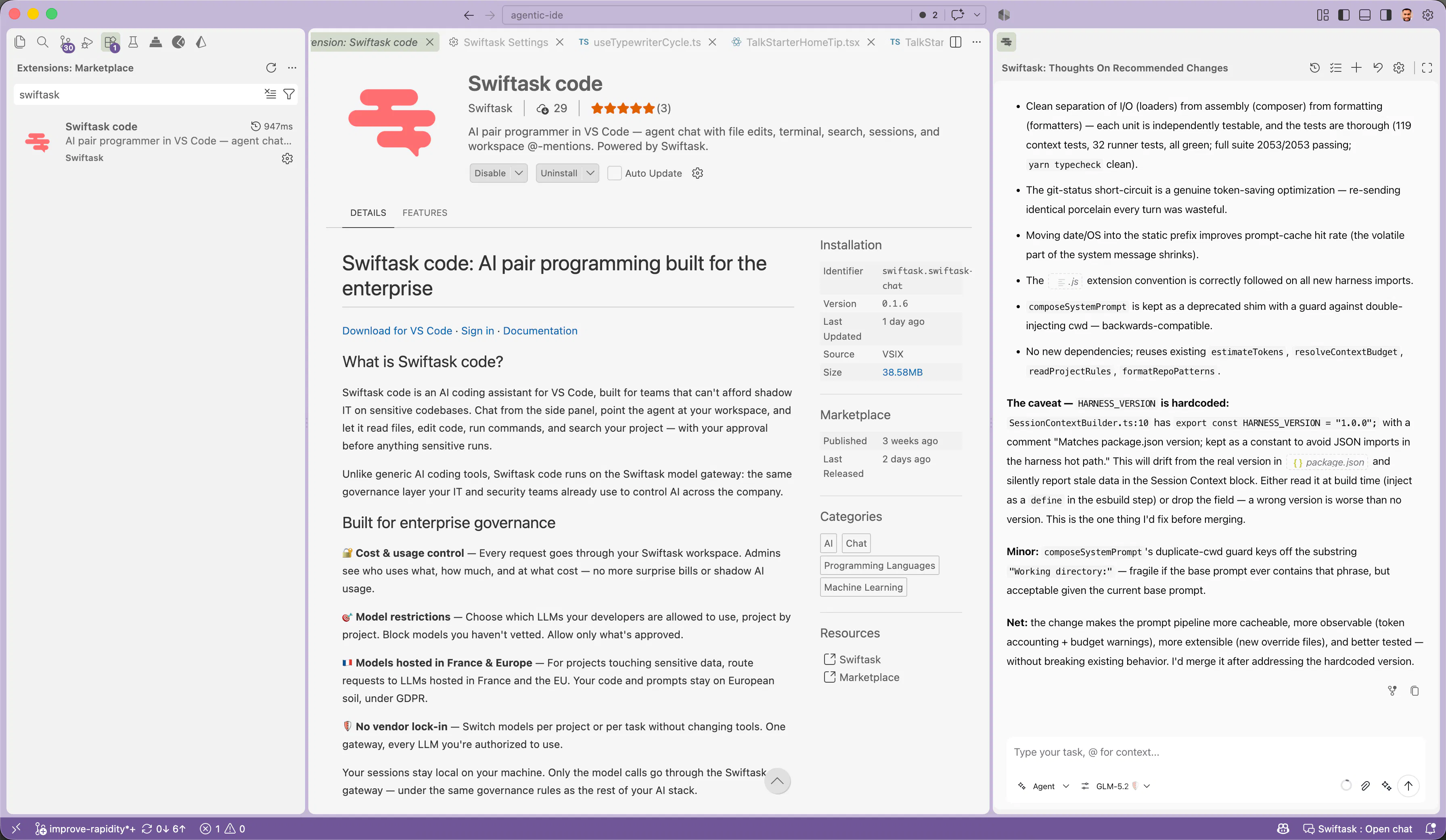
Swiftask code brings these capabilities into Visual Studio Code while keeping sensitive actions subject to developer approval.
Four autonomy levels to know
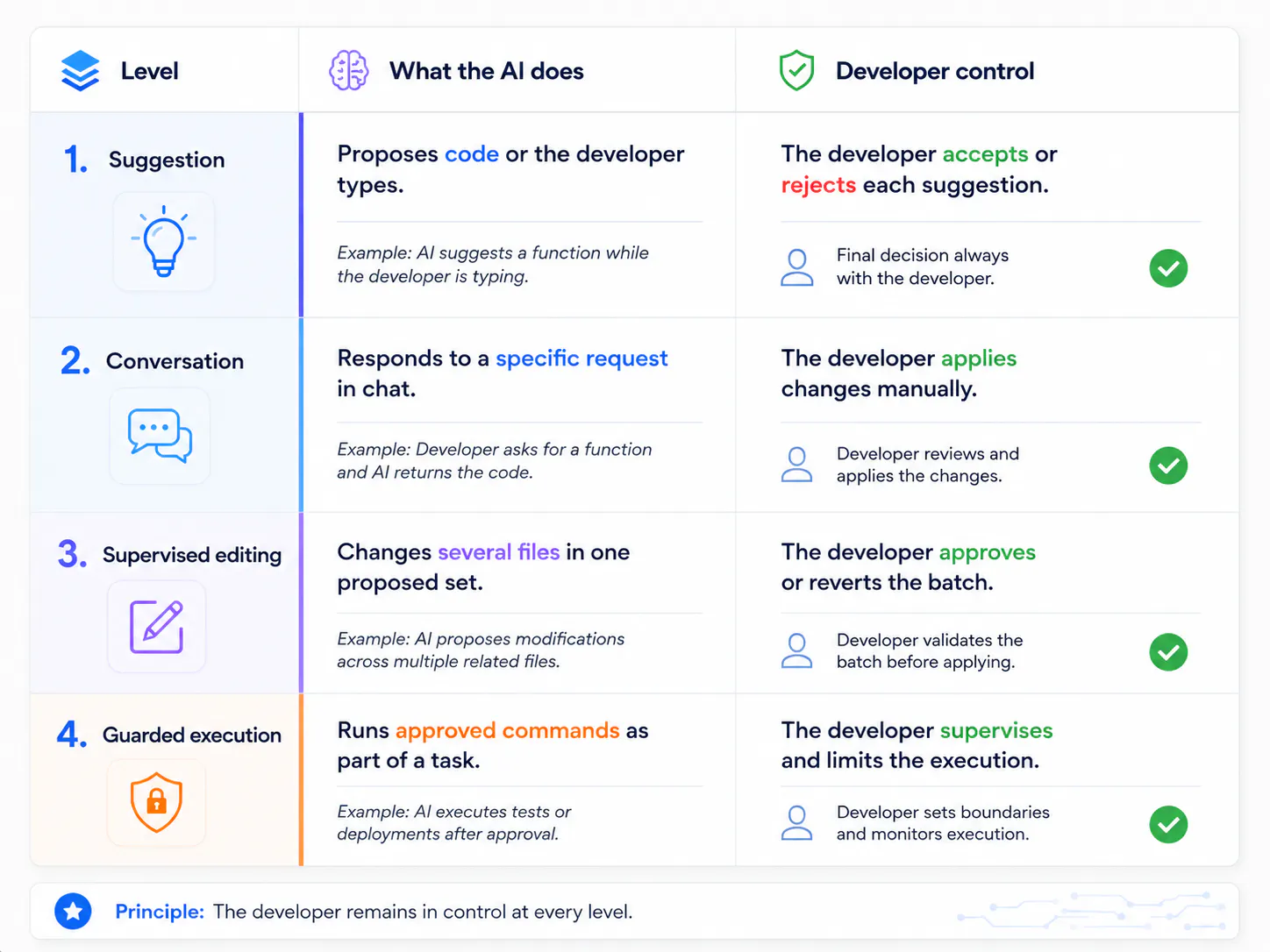
The fourth level can remove friction from routine work, but it also carries the highest risk. A simple operating rule helps: destructive actions should never run without human approval.
Where AI-assisted coding helps engineering teams
AI-assisted coding creates its strongest value in execution and comprehension work, not in architecture decisions. It can reduce repetitive effort while leaving technical ownership with the engineering team.
Swiftask supports this model by giving developers an agent inside their editor and giving IT teams visibility into model usage, access, and spend.
High-value AI coding use cases
AI coding is especially useful for:
- Understanding an unfamiliar codebase. A developer joining a legacy project can ask focused questions about flows, dependencies, and conventions before escalating to a senior engineer.
- Reducing repetitive work. Unit tests, syntax migrations, documentation updates, boilerplate, and one-off scripts are common candidates.
- Performing a first-pass review. AI can flag obvious omissions before a human reviewer evaluates design choices, business logic, and architecture.
- Translating code between languages. Teams can use AI to help move a Python script to TypeScript or interpret a legacy COBOL routine.
Where AI coding falls short
AI coding tools should not be treated as technical decision-makers. They cannot reliably resolve:
- Architecture trade-offs
- Implicit business constraints
- Organizational history behind past engineering decisions
- Accountability for production choices
An agent may understand the code it can access. It does not inherently know why your organization rejected microservices three years ago.
In summary: AI coding accelerates known work. It does not replace engineering judgment when requirements are uncertain or trade-offs are strategic.
The risks of AI coding in the enterprise
The main enterprise risk is not that developers use AI. It is that they use it without a shared operating model. Shadow AI use can expose source code, fragment spending, and create undocumented technical debt.
1. Shadow AI around source code
A developer installs a free AI coding tool. No one knows which model receives requests, where data is processed, or what contract governs the service.
Proprietary source code can leave the organization without a clear record of its path or use.
2. Sensitive data exposure
Prompts often contain more than code. They can include API keys, database schemas, customer identifiers, security configuration, and confidential business logic.
Teams need to understand where models process data and whether a provider may retain or use submitted content. Swiftask AI governance centralizes permissions, usage visibility, and approved model access.
3. Silent technical debt
Code that works but is not understood by the team becomes harder to maintain. The risk rises when generated changes are merged without review, tests, documentation, or ownership.
Treat AI output like any external contribution: inspect it, test it, and make sure someone can explain it.
4. Uncontrolled spending
Model usage can become difficult to track when developers subscribe to separate tools or use personal accounts. Without budgets and reporting, technology leaders may only discover the total cost after the billing period closes.
5. Vendor lock-in
A single-model or single-vendor workflow can limit your options when pricing, performance, terms, or availability changes. Enterprise teams benefit from separating their AI workflow from a specific model provider.
Key takeaway: Source code protection, access control, cost oversight, and vendor flexibility all point to the same solution: route model use through one governed enterprise layer.
How to choose an AI coding assistant: six criteria that matter
The right AI coding assistant must support developers without removing IT’s ability to manage security, cost, and access. Code quality alone is not enough for an enterprise deployment.
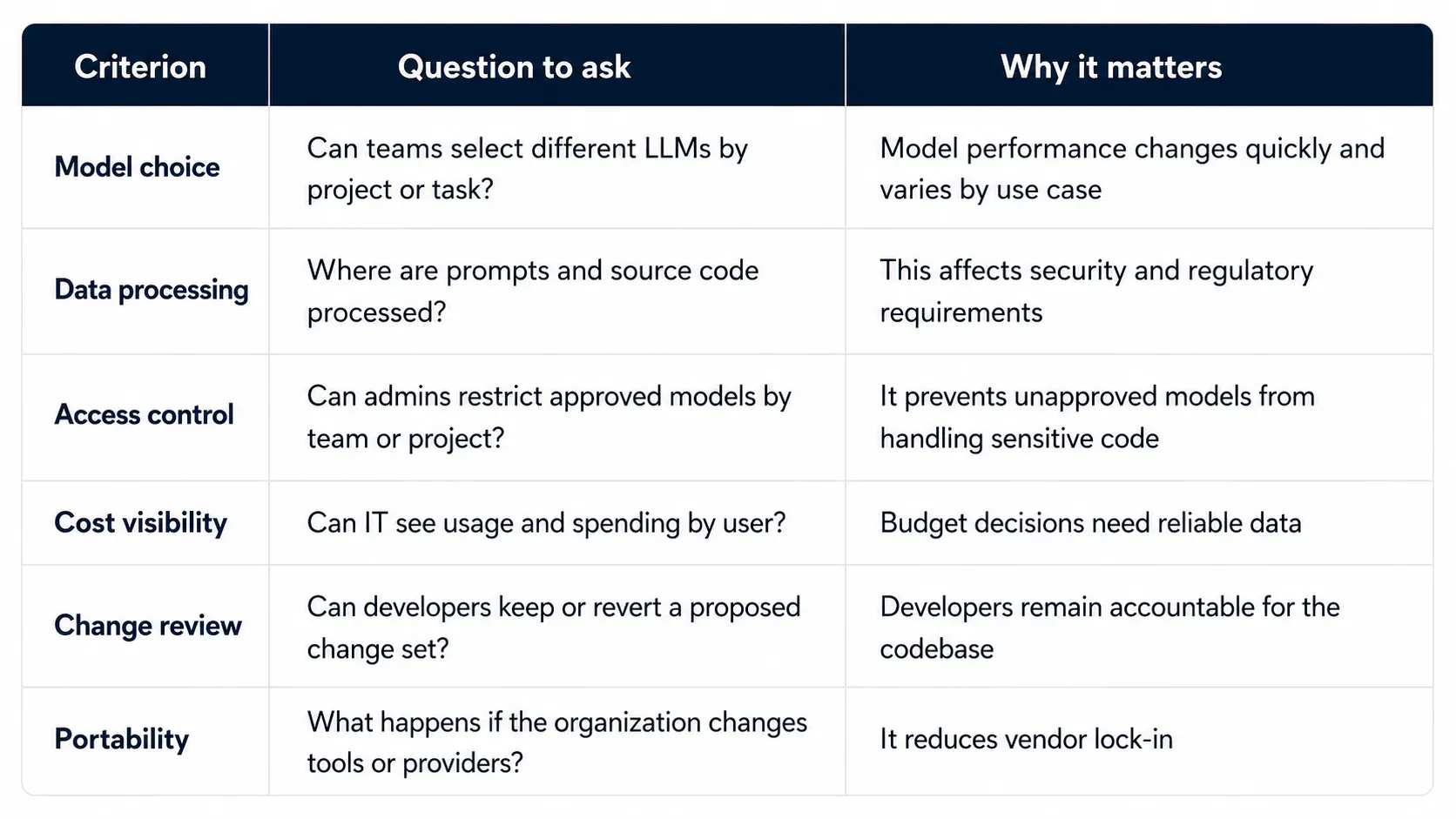
A tool that writes excellent code but fails on most of these criteria is not a viable enterprise platform.
AI coding in VS Code with Swiftask
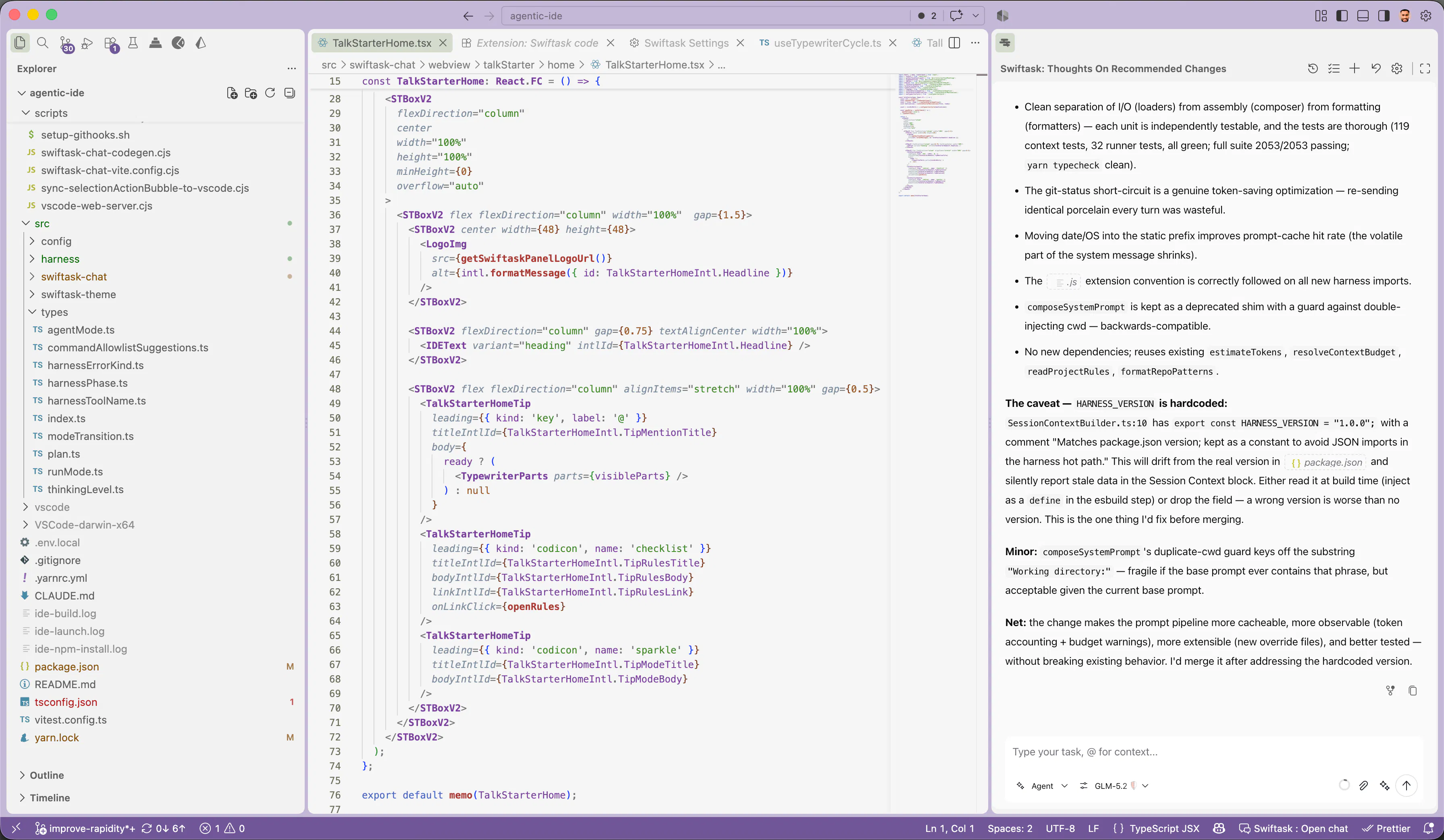
Swiftask code is a Visual Studio Code extension that provides an AI coding agent inside the editor, backed by Swiftask governance. It is designed for teams that need practical developer assistance without unmanaged AI use on sensitive codebases.
What the AI coding agent can do
Within a developer’s workspace, the agent can:
- Read, edit, and create files
- Search across the project
- Run shell commands after approval
- Use explicit file, folder, and terminal references as context
- Follow task lists for multi-step work
- Ask structured questions when a request is ambiguous
- Let developers keep or revert changes from the editor toolbar
This workflow keeps the developer in control of the workspace and the final result.
What IT and security teams can manage
Swiftask gives administrators a centralized view of AI coding activity:
- Usage and costs by user in the Swiftask workspace
- Lists of approved models that can be adjusted by project
- A model gateway that applies the same governance rules used across enterprise AI activities
- The ability to route sensitive workloads to models hosted in France or Europe, where applicable
Developer work sessions remain stored locally on the developer’s machine. Model calls pass through the Swiftask gateway under your workspace policies.
The same governance layer can also support custom AI agents connected to business tools, data, and workflows beyond software development.
Get started in four steps
- Install the Swiftask code extension from the Visual Studio Code Marketplace. It requires VS Code 1.85 or later.
- Open the Swiftask panel from the Activity Bar.
- Sign in with your Swiftask account. Available models reflect your workspace rules.
- Give the agent a first task: fix a bug, write a test, explain a function, or propose a refactoring plan.
FAQ
No AI coding assistant stays best for every task. Model capabilities change frequently, and performance depends on the language, codebase, context, and task type. A practical enterprise approach is to retain the ability to choose approved models without changing tools.
Yes, several vendors offer free plans. Swiftask code is also available through a Swiftask account. For an organization, the more important question is whether usage, data handling, access, and cost remain visible.
That depends on the provider, its data-processing terms, and where requests are handled. Teams working with sensitive repositories should verify data location, retention rules, access controls, and whether submitted data is excluded from model training.
AI can automate parts of development work, such as drafting tests, explaining code, or applying repetitive changes. Developers still own requirements, architecture, business constraints, security decisions, reviews, and production accountability.
Yes. General-purpose coding models can support common languages including Python, JavaScript, TypeScript, PHP, Java, and more. Results depend more on context and task complexity than on the language alone.
Yes. Some enterprise platforms, including Swiftask, can route requests to models hosted in France or Europe for projects with sensitive data requirements.
AI coding is already part of software development. The outstanding decision is the operating model: which models can access which projects, at what cost, under which review process, and with what audit trail.
Teams that define this framework early can support developer productivity without discovering later that their source code has been shared across unmanaged services. Install Swiftask code in VS Code and give your developers an AI coding assistant that IT can actually govern.
author
OSNI

Published
August 26, 2026
Ready to transform your business with AI?
Discover how AI can transform your business and improve your productivity.